System Data, explained.System Data, nói rõ từng phần.
The grey bar in Storage settings, split into 30 parts. Each one with its size, its risk and what to do about it.Thanh xám trong Cài đặt › Dung lượng, tách thành 30 phần. Mỗi phần có dung lượng, mức rủi ro và việc nên làm.
Coming soon to the Mac App StoreSắp có trên Mac App Store
Free · macOS 14 or later · Pro, a one-time $14.99, arrives in version 1.1Miễn phí · macOS 14 trở lên · Pro mua một lần 199.000 ₫, có từ bản 1.1
Macintosh HD216.97 GB / 245.11 GB
System Data
134.99 GBNo breakdown in macOSmacOS không cho xem chi tiết
84.74 GBImportant or managed by macOSQuan trọng hoặc macOS quản lý
FreeCòn trống
28.14 GBMacintosh HD
Numbers from a real scan on a 245 GB MacBook, as in the App Store screenshots.Số liệu từ một lần quét thật trên MacBook 245 GB, giống ảnh trên App Store.
Read before you deleteĐọc trước khi xóa
Every part answers three questions.Mỗi phần trả lời đủ ba câu hỏi.
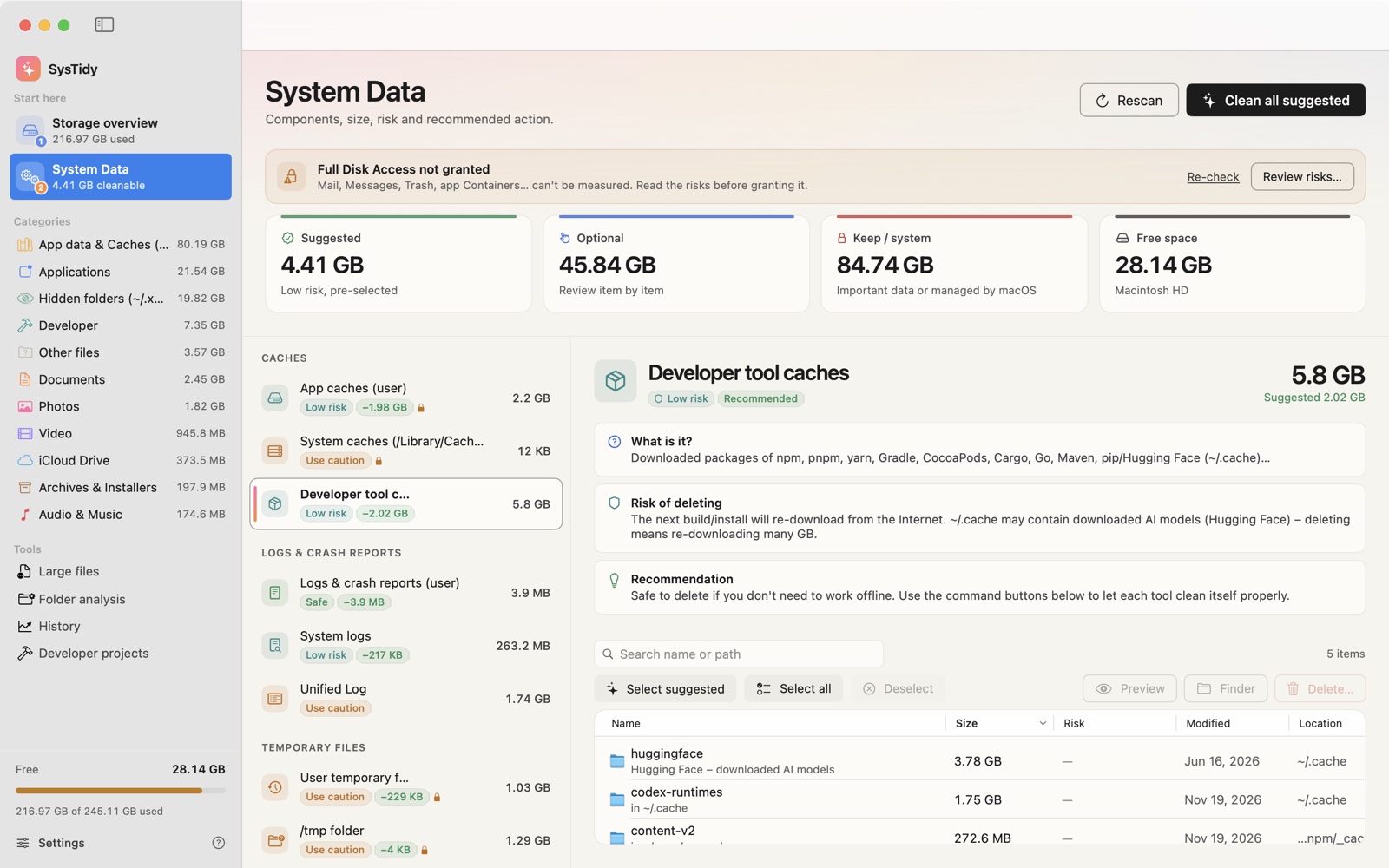
What is it, what happens if it goes, and what SysTidy recommends. Three of the 30 parts, word for word from the app:Nó là gì, xóa đi thì sao, và SysTidy khuyên gì. Ba trong 30 phần, nguyên văn trong app:
Xcode DerivedDataXcode DerivedData
SafeAn toànRecommendedNên dọn
What is it?Đây là gì?
Build products, indexes and build caches of Xcode projects.Kết quả biên dịch, chỉ mục và bộ đệm build của các dự án Xcode.
Risk of deletingRủi ro khi xóa
The next build will take longer. Quit Xcode before deleting.Lần build tiếp theo sẽ lâu hơn. Thoát Xcode trước khi xóa.
RecommendationĐề xuất
Safe to delete – often several GB.Xóa an toàn – thường chiếm nhiều GB.
Developer tool cachesCache công cụ lập trình
Low riskRủi ro thấpRecommendedNên dọn
What is it?Đây là gì?
Downloaded packages of npm, pnpm, yarn, Gradle, CocoaPods, Cargo, Go, Maven, pip/Hugging Face (~/.cache)…Gói thư viện đã tải về của npm, pnpm, yarn, Gradle, CocoaPods, Cargo, Go, Maven, pip/Hugging Face (~/.cache)…
Risk of deletingRủi ro khi xóa
The next build/install will re-download from the Internet. ~/.cache may contain downloaded AI models (Hugging Face) – deleting means re-downloading many GB.Lần build/cài gói tiếp theo sẽ tải lại từ Internet. Riêng ~/.cache có thể chứa mô hình AI đã tải (Hugging Face) – xóa sẽ phải tải lại nhiều GB.
RecommendationĐề xuất
Safe to delete if you don't need to work offline. Use the command buttons below to let each tool clean itself properly.An toàn để xóa nếu bạn không cần làm việc offline. Có thể dùng các nút lệnh bên dưới để công cụ tự dọn đúng cách.
$ npm cache clean --force
Docker (VM disk image)Docker (ảnh đĩa VM)
High riskRủi ro caoKeepKhông nên xóa
What is it?Đây là gì?
The Docker.raw virtual disk holding images, containers, volumes and build cache.Ổ đĩa ảo Docker.raw chứa image, container, volume và build cache.
Risk of deletingRủi ro khi xóa
Deleting the file directly loses all images/containers/volumes.Xóa tệp trực tiếp sẽ mất toàn bộ image/container/volume.
RecommendationĐề xuất
Don't delete the file. Use Docker's prune command to remove stopped containers, dangling images and build cache.Đừng xóa tệp. Hãy dùng lệnh dọn của Docker để xóa container đã dừng, image treo và build cache.
$ docker system prune -f
Five risk levelsNăm mức rủi ro
Only the safe part is pre-selected.Chỉ phần an toàn được chọn sẵn.
Caches of apps you already uninstalled, temp files older than three days, third-party caches. Everything else waits for you. Files go to the Trash by default, and system folders like /System and ~/Library itself are blocked outright.Cache của app đã gỡ, tệp tạm cũ hơn ba ngày, cache của app bên thứ ba. Phần còn lại chờ bạn quyết. Mặc định tệp được chuyển vào Thùng rác, và các thư mục như /System hay chính ~/Library bị chặn cứng.
SafeAn toànRebuilt automatically. Delete freely.Tự tạo lại. Xóa thoải mái.
Low riskRủi ro thấpCosts a re-download or a slower first launch.Chỉ tốn một lần tải lại hoặc mở chậm hơn lần đầu.
Use cautionCần cân nhắcRead the note first; some of it may still be in use.Đọc ghi chú trước; một phần có thể vẫn đang được dùng.
High riskRủi ro caoCan hold real data. SysTidy says keep it.Có thể chứa dữ liệu thật. SysTidy khuyên giữ lại.
System managedHệ thống quản lýmacOS manages it. View only.macOS tự quản lý. Chỉ xem.
No Terminal neededKhông cần gõ Terminal
The right command, shown before it runs.Đúng lệnh, hiện rõ trước khi chạy.
Some parts should be cleaned by their own tool, not by deleting files. SysTidy offers the command, shows it in full and asks first. Admin commands use the standard macOS password dialog.Có phần nên để chính công cụ của nó dọn, không xóa tệp trực tiếp. SysTidy đưa ra lệnh, hiện đủ nội dung và hỏi trước. Lệnh cần quyền quản trị dùng hộp thoại mật khẩu của macOS.
brew cleanup --prune=allOld Homebrew packages and downloadsGói Homebrew cũ và bộ đệm tải xuống
xcrun simctl delete unavailableSimulators whose runtime is goneSimulator không còn runtime
docker system prune -fStopped containers, dangling images, build cacheContainer đã dừng, image treo, build cache
tmutil deletelocalsnapshots /Local Time Machine snapshotsSnapshot Time Machine cục bộ
SysTidy Pro · new in 1.1mới ở bản 1.1
Know what grew. Before the disk fills up.Biết cái gì phình ra, trước khi ổ đầy.
Pro
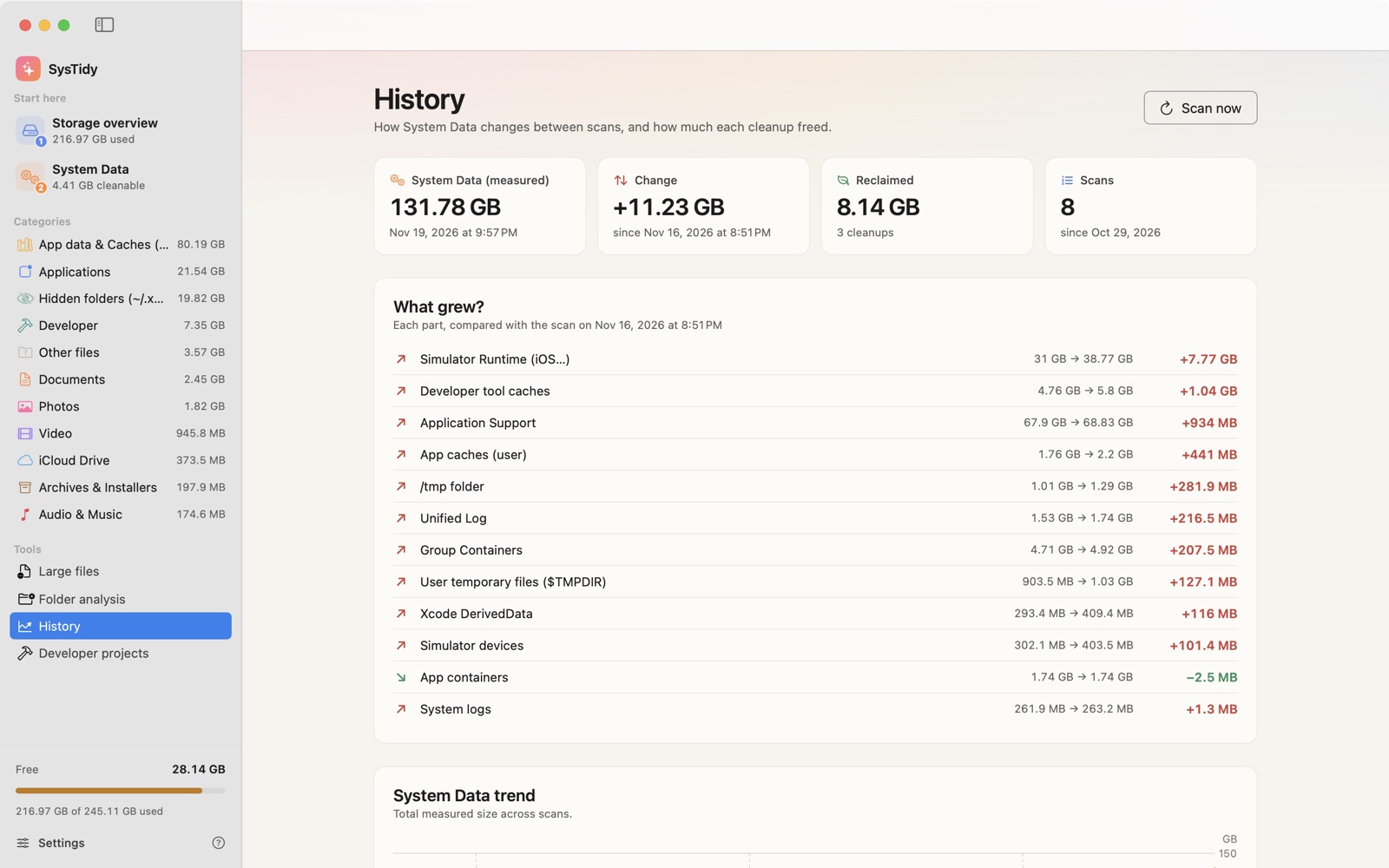
History, part by part.Lịch sử, từng thành phần.
Every scan is kept on your Mac. Compare two scans and see exactly which part of System Data grew, a trend chart, and how much each cleanup freed. Set an alert for when System Data grows past a threshold you choose.Mỗi lần quét được lưu trên máy. So hai lần quét để thấy chính xác phần nào của System Data phình ra, biểu đồ xu hướng và mỗi lần dọn thu hồi bao nhiêu. Đặt cảnh báo khi System Data tăng vượt ngưỡng bạn chọn.
Pro
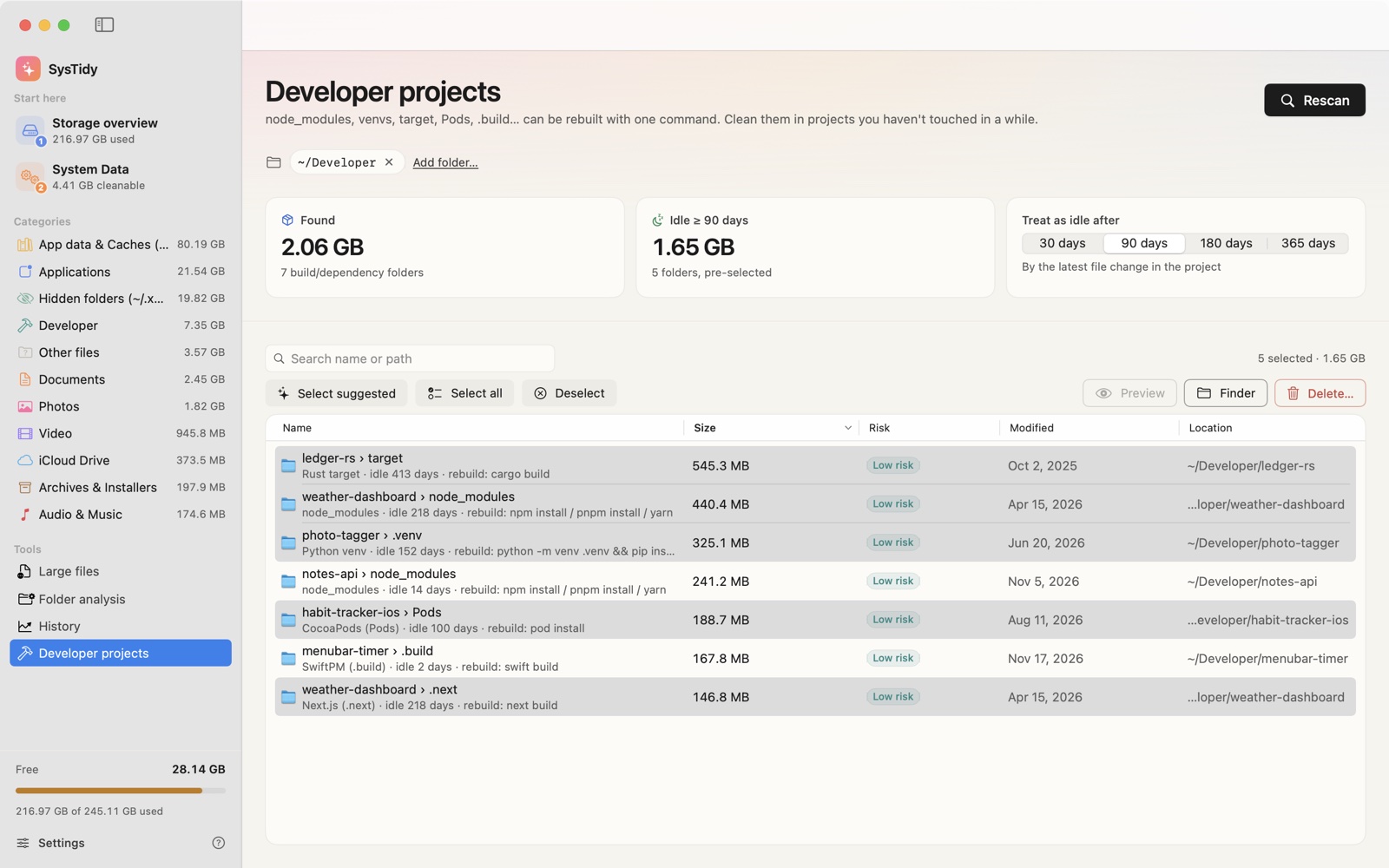
Developer projects you forgot about.Những dự án lập trình bạn đã quên.
Point SysTidy at ~/Developer. It finds node_modules, .venv, target, Pods, .next and .build folders, shows how long each project has been idle and the command that rebuilds it. It reads folder names and sizes only, never your source code.Chọn thư mục ~/Developer. SysTidy tìm node_modules, .venv, target, Pods, .next, .build, cho biết dự án đã bỏ không bao lâu và lệnh để tạo lại. Chỉ đọc tên và dung lượng thư mục, không đọc mã nguồn.
PricingGiá
Pay once. Not every month.Trả một lần. Không thuê bao.
FreeMiễn phí
$0
On the Mac App Store soonSắp có trên Mac App Store
Scan, explanations and risk levels for all 30 partsQuét, giải thích và mức rủi ro cho cả 30 phần
Storage overview, large files, folder analysisTổng quan bộ nhớ, tệp lớn, phân tích thư mục
Clean up to 5 GB in totalDọn tổng cộng tối đa 5 GB
History: total change between scansLịch sử: tổng thay đổi giữa các lần quét
SysTidy Pro
$14.99199.000 ₫
One-time in-app purchase from version 1.1 · Family SharingMua một lần trong app, từ bản 1.1 · Chia sẻ trong gia đình
Unlimited cleaningDọn không giới hạn
Clean all suggested in one clickDọn tất cả đề xuất với một chạm
History: what grew, trend, cleanup logLịch sử: cái gì phình ra, xu hướng, nhật ký dọn
Developer projects cleanupDọn dự án lập trình
Alerts when System Data growsCảnh báo khi System Data tăng
Install version 1.0 when it launches and Pro is yours at no cost when 1.1 arrives.Cài bản 1.0 khi ra mắt, bạn được tặng Pro khi bản 1.1 phát hành.
Nothing leaves your Mac.Không gì rời khỏi máy bạn.
No network codeKhông có mã mạng
No server, no account, no analytics, no ads.Không máy chủ, không tài khoản, không analytics, không quảng cáo.
Metadata onlyChỉ đọc thông tin tệp
Names, sizes and dates. Never file contents.Tên, dung lượng, ngày sửa. Không đọc nội dung.
Never on its ownKhông tự xóa
You select and confirm. Trash by default.Bạn chọn và xác nhận. Mặc định vào Thùng rác.
Honest about accessNói rõ về quyền
Full Disk Access is optional, with the risks explained first.Full Disk Access không bắt buộc, có giải thích rủi ro trước.
FAQ
What is System Data?System Data là gì?
It is the grey part of the bar in System Settings › General › Storage. macOS puts caches, logs, temporary files, installers, developer tools, backups and app data there without showing what is inside. SysTidy splits it into about 30 parts in 8 groups.Là phần màu xám trong Cài đặt hệ thống › Cài đặt chung › Dung lượng. macOS gộp cache, log, tệp tạm, bộ cài, công cụ lập trình, sao lưu và dữ liệu app vào đó mà không cho xem bên trong. SysTidy tách nó thành khoảng 30 phần trong 8 nhóm.
Does SysTidy delete anything on its own?SysTidy có tự xóa gì không?
No. Nothing is removed until you select items and confirm. By default, files are moved to the Trash so you can restore them.Không. Không gì bị xóa cho tới khi bạn chọn và xác nhận. Mặc định tệp được chuyển vào Thùng rác để bạn khôi phục được.
Why does it ask me to choose my Home folder?Sao app hỏi chọn thư mục Home?
Mac App Store apps run in a sandbox. Choosing your Home folder once lets SysTidy measure caches, logs and app data inside ~/Library. The permission is remembered.App trên Mac App Store chạy trong sandbox. Chọn thư mục Home một lần để SysTidy đo được cache, log và dữ liệu app trong ~/Library. Quyền này được ghi nhớ.
Is Pro a subscription?Pro có phải thuê bao không?
No. Pro is a one-time in-app purchase ($14.99 in the US) with Family Sharing. Scanning, explanations and risk levels stay free, and you can clean up to 5 GB in total for free. Restore it any time in Settings › SysTidy Pro.Không. Pro là gói mua một lần trong app (199.000 ₫ tại Việt Nam), hỗ trợ Chia sẻ trong gia đình. Quét, giải thích và mức rủi ro vẫn miễn phí, bạn được dọn miễn phí tổng cộng 5 GB. Khôi phục giao dịch trong Cài đặt › SysTidy Pro.
Which Macs does it run on?Chạy trên máy Mac nào?
macOS 14 Sonoma or later. The app is in English and Vietnamese, with light and dark mode.macOS 14 Sonoma trở lên. App có tiếng Anh và tiếng Việt, giao diện sáng và tối.
See what's in the grey bar.Xem trong thanh xám có gì.
Coming soon to the Mac App StoreSắp có trên Mac App Store
Free · macOS 14 or laterMiễn phí · macOS 14 trở lên
 SysTidy